
How To Use AI Like a Seasoned Developer
AI follows patterns. If your project is messy, AI will amplify the mess.

TL;DR: Structure prevents drift. Specs anchor the architecture. Invariants keep the system honest. Testing keeps the AI honest. A clean project layout keeps the AI from hallucinating. Your job isn’t to do all the work, it’s to steer, verify, and maintain clarity so the AI can carry the weight without collapsing the project.
AI is a force multiplier, but only if you use it like an engineer instead of like someone that found a genie in a bottle.
AI accelerates everything, including mistakes. The more power you give it, the more structure you need. A disciplined workflow prevents drift, rewrites, and architectural collapse. And here’s the part most people miss:
Lazy coders can actually be more efficient.
If you’re the type who wants to minimize effort, avoid unnecessary work, and let AI handle the heavy lifting, then structure becomes even more important. The lazier you are, the cleaner your system must be, because you’re relying on AI to do the right thing automatically.
Navigate Your Project
The most important skill is being able to navigate your project. If you can’t, you’re flying blind, and you already know how that story ends.
“Navigate your project” means you can move through the codebase, docs, and architecture with confidence. You know where things live, why they exist, and how they connect. If you’re unsure about anything then ask the AI to elaborate or create diagrams. If you don’t understand what you’re building, then how can you expect the AI to build it successfully?
Analogy: Navigating your project is like working in a well‑organized workshop. If every tool has a place, you can build fast. If everything is scattered, you waste half your time looking for the hammer you just used. AI is the same way as it can only work efficiently if the workspace makes sense.
Start With the Core: The Formal Specification
You need to identify the core of the system or whatever it is that you’re building and create a formal specification. Move back and forth between different AIs to refine it. Spend most of your time here, because anything you miss now can force you into redoing major architectural decisions later. Even if that happens, you can recover. As long as you stay disciplined and maintain a clear plan that prevents drift.
Analogy: Driving cross‑country without a map is possible, but having one dramatically increases your chances of success and usually gets you there much faster.
Create the spec → formalize it → tear it apart → fix it → freeze it
Once the spec is frozen, everything else becomes far easier. After freezing it, expand your documentation with:
threat models
state machines or other major components
implementation plans
invariants, the conditions that must always hold true
Invariants prevent subtle drift and keep the architecture coherent as AI generates code.
Analogy: Measure twice, cut once.
Guidelines
Organized file/folder structure
Clear separation of concerns
Consistent naming
Single Responsibility Principle (SRP)
No legacy, deprecated, duplicated, or unused code; stay DRY
When a file becomes too large, refactor it so it still follows SRP
When a folder accumulates too many files, group and reorganize
When you think you’re done, ask:
Is this Production‑ready? Enterprise‑grade? Mathematically sound? If not, what’s missing?
Minimal Top‑Level Folder Structure
A clean project starts with a clean top‑level layout, and remember:
A clean structure isn’t aesthetic, it’s how you prevent AI from hallucinating architecture, duplicating logic, or drifting into inconsistent patterns.
AI follows patterns.
If your project is messy, AI will amplify the mess.
If your project is clean, AI will amplify the clarity.
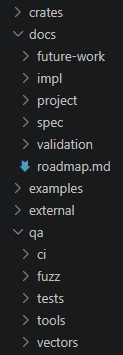
I’ve started using this structure as my baseline:
crates/
docs/
qa/
examples/
external/
scripts/
crates/
Specific to Rust, but you can rename it to components or something similar. This folder holds all sub‑modules and pieces of the system. This is where the actual coding happens. Keep it as modular as possible so it’s easy to maintain.
docs/
I break this into:
future-work/ — Ideas, features, brainstorming, long‑term plans.
impl/ — Implementation‑focused docs, everything that helps once you start writing actual code. I look at it as the scaffolding.
spec/ — The core specifications. This is where the foundational documents live.
validation/ — Anything related to proving the code follows the spec: formal verification, proofs, checks, etc.
project/ — This is for the AI. Sometimes AI tools generate their own helper docs, audits, or summaries. I let them store those here.
I try to keep a single roadmap.md and overwrite it as I complete milestones.
I’ll create a temporary roadmap for a specific subsystem or for each step in the high level roadmap; once that part is done, I delete it. Basically: A broad high‑level roadmap + detailed temporary roadmaps.
qa/
All correctness‑related work lives here:
ci/ — local CI scripts, pipelines, automation
fuzz/ — fuzzing harnesses
tools/ — internal QA utilities
vectors/ — test vectors, protocol fixtures
tests/ — global/system tests (multi‑node, end‑to‑end, doc‑consistency, invariant checks)
This is also where I keep my single master test script, the one command that runs everything.
examples/
This folder holds runnable examples and minimal demo programs.
These are small, self‑contained entry points that show how to use the system.
external/
Third‑party apps, libraries, or external dependencies.
scripts/
This folder holds all automation scripts that aren’t part of QA itself. Scripts are also where you keep your baseline environment setup, so you can recreate your dev environment instantly on any machine.
All together:
Testing: The Discipline That Keeps Everything Honest
Testing is the part most people skip, and it’s exactly why their AI‑assisted projects drift, break, or collapse under their own weight. I treat testing as a guardrail, not something I do at the end, but something I run every single time AI touches the code or the docs.
My workflow is simple: I keep one master test script that runs everything. Unit tests, integration tests, fuzzing, formal checks, doc‑consistency tests; all of it. One command. One place. One habit.
If something breaks, I can run individual tests to isolate the issue, but the master script is the heartbeat of the project. It’s the thing that tells me whether the AI stayed aligned with the spec or drifted into nonsense.
Testing often is important because AI can:
introduce subtle bugs even when the code “looks right.”
accidentally change behavior while refactoring.
update code without updating docs.
update docs without updating code.
misunderstand invariants unless you constantly enforce them.
Running the full test suite after every AI‑generated change is how you prevent silent failures, but it can be more time consuming. So, sometimes I’ll lie to the AI and tell it the tests are all passing, proceed with the next step while the tests are actually still running. If anything fails, then on the next prompt I’ll report the exact error, and have the AI fix it before moving forward. This keeps momentum high without sacrificing correctness.
And yes, I even test the docs.
I run checks to ensure the documentation still matches the spec, the invariants, and the implementation. If the docs drift, the architecture drifts. If the architecture drifts, the AI starts hallucinating structure. Testing the docs keeps the entire system coherent.
Analogy: Testing is like checking your compass every time you take a step.
You can skip steps, but if you don’t check enough, you can walk miles in the wrong direction without realizing it.
Common Failure Modes
These are the things that destroy AI‑assisted projects:
AI/architecture drift
duplicated logic
inconsistent naming
spec mismatch
folder sprawl
monolithic files
simulated/mock data
If you’ve ever built anything with AI, you’ve likely seen some, if not all, of these. Another one is hitting context limits and being forced into a new chat. That’s why roadmaps are so important, they’re the bridge between sessions. Even better is migrating before the cutoff: ask the current AI to generate a hand-off document for the next project leader for continuity and consistency.
Version control can fail the same way. Letting the AI manage it is fine, but only if you understand the workflow too. If you don’t, then at minimum archive the entire repo as a .zip and treat it as your stable version 1.0. Losing history or corrupting the repo is just another form of drift.
Analogy: A good roadmap is like a fire escape plan, you don’t think about it until the building is burning, and by then it’s too late to draw one.
Core Loop
Once the skeleton is in place, the high‑level roadmap, the frozen specs, and the foundational docs, the project enters the core loop. This loop is where the real work happens, and where AI becomes a force multiplier instead of a source of chaos.
The loop is simple:
Create a detailed roadmap for the current phase of the high‑level plan.
Have the AI implement that roadmap step‑by‑step, running the full test suite after each step.
Perform a cleanup audit to ensure the top‑level guidelines are still being enforced like structure, naming, folder layout, invariants, and spec alignment.
Sometimes the cleanup reveals drift or architectural messiness. When that happens, I create a temporary roadmap dedicated solely to restoring order. Once the system is clean again, I return to step one and continue the loop.
I repeat this cycle until every item in the high‑level roadmap is complete. Only then do I switch into final verification: testing anything that must work flawlessly, polishing the GUI if one exists, and validating that the implementation matches the frozen spec.
Analogy: The core loop is like sharpening your tools after every cut. The work goes faster, the results stay clean, and you never let the blade dull enough to ruin the project.
Conclusion
Everything I’ve shared here is simply what I’ve found that works for me. It doesn’t mean it’s the best method, the only method, or the “correct” method. It’s just the one that consistently keeps my projects stable, predictable, and moving forward. I’m always open to suggestions, improvements, or entirely different approaches.
The real advantage of this workflow is that it lets you operate with a high‑level understanding at all times, even when the underlying system is extremely complex. You don’t need to be a world‑class cryptographer, distributed‑systems researcher, or formal‑verification expert. You just need enough clarity to guide the AI, check its work, and understand the architecture you’re building.
AI can handle the deep complexity, the kind of stuff you could spend your whole life trying to learn, but it isn’t very useful unless you give it structure. Use AI like a calculator, but also use AI to check itself. Cross‑verify. Ask it to explain. Ask it to prove. Ask it to diagram. Ultimately, you must understand what’s happening at a conceptual level, because if you don’t, the AI can lie to you, drift, or build on incorrect assumptions.
The workflow isn’t about doing everything yourself.
It’s about knowing enough to steer the system.
Build the structure once, keep your understanding sharp, and let AI carry the weight.
Analogy: You don’t have to be a mechanic to drive, but you do need to know when the engine is making a noise it shouldn’t. AI is the same way.